The deepest check for copied and AI-written code
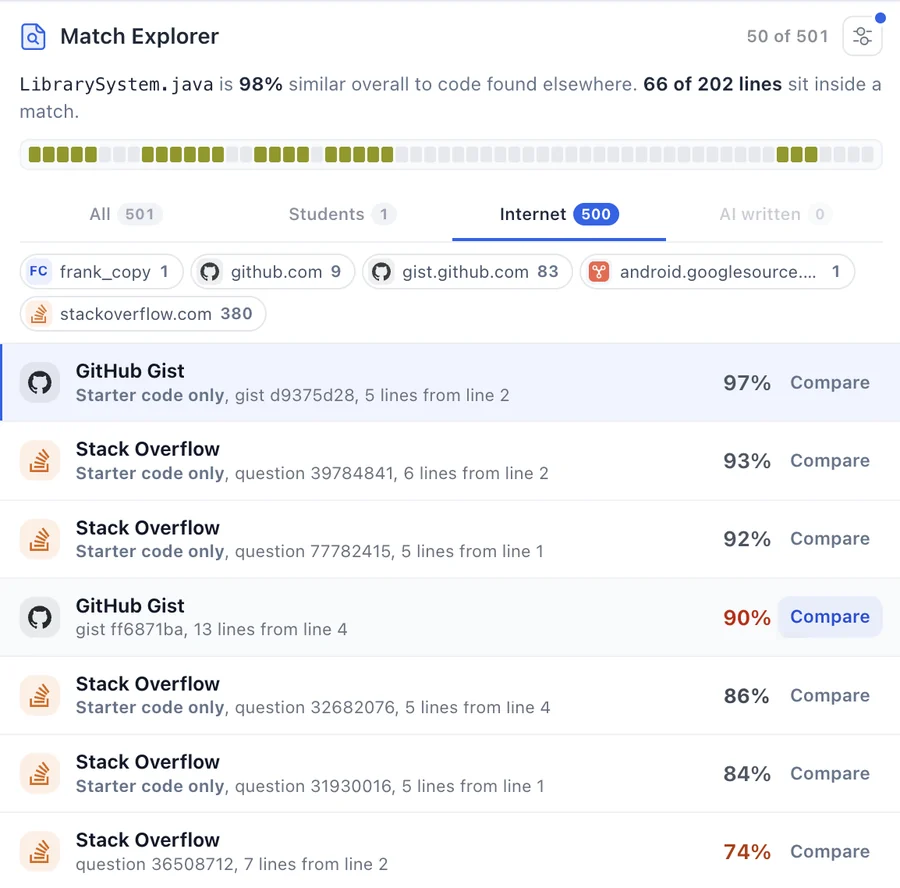
A Deep Scan compares every submission with the class, searches GitHub, Stack Overflow, Chegg and 427B+ code sources on the web, and flags AI-written code. Every match comes with the lines side by side and a link to where it came from.
Deep Scans are included with every Codequiry plan for institutions.
What a Deep Scan checks
Three checks in one run, read together in one report.
The web
GitHub repositories, Stack Overflow, Chegg, course-sharing sites and open-source projects, 427B+ sources in all. Each match links to its source.
The rest of the class
Every submission compared with every other, each pair scored, the shared lines highlighted. Starter code you hand out is labelled as such.
AI-written code
Code from ChatGPT, Claude, Gemini, GitHub Copilot and Cursor. Two models score every file, kept separate from the similarity results.
Proof you can put in front of a review panel
A percentage starts an argument. A Deep Scan shows the copied lines next to their source, so the conversation starts from evidence.
- Side-by-side code with the matching lines highlighted
- Renamed variables and reordered blocks still line up
- A report you can download and keep on file

How to run a Deep Scan
Deep Scans run inside your Codequiry account, alongside the rest of your course.
- 1Open an account for your institutionPick a plan and sign up with your school email. Every plan includes Deep Scans each month.
- 2Upload the submissionsDrop in a ZIP per student, connect your LMS, or send them through the API.
- 3Read the reportResults arrive in minutes, with every match side by side and AI scores for each file.
Questions
What is a Deep Scan?
A Deep Scan compares every submission with the rest of the class, searches GitHub, Stack Overflow, Chegg and 427B+ other code sources on the web, and checks each file for AI-written code. You get one report with every match shown side by side.
Can I buy a single Deep Scan?
Not any more. Deep Scans run inside a Codequiry account, and every plan includes them each month. See the plans to pick the one that fits your department.
Who can use it?
Professors, educators and education professionals at schools, colleges and universities. Accounts are opened with an institutional email address.
Which languages does it read?
More than 65, including Python, Java, C, C++, C#, JavaScript, TypeScript, PHP, Go, Kotlin, Swift, Ruby and SQL.
Does it catch code that was renamed or reshuffled?
Yes. Hexagram, the engine we built in-house, reads the structure of the code rather than its text, so renamed variables, moved functions and reordered blocks still line up.
Who sees my files and results?
Only your account. Submissions are not published, shared with other customers or shown anywhere public.
I bought a Deep Scan before. Where is my report?
Your report link from the email still works. Open it from that email to see or download the results.
Read about AI code detection, what MOSS misses, or Codequiry for educators.
Run Deep Scans on your next assignment
Every plan includes them, alongside the class comparison and AI detection.
See the plans