
Last spring I graded 47 submissions for a data structures assignment on tree traversals. One submission jumped out immediately. The iterative in-order traversal function was line-for-line identical to a 2016 Stack Overflow answer, down to the variable names root, stack, and current. The student hadn't copied from a classmate. Peer similarity checkers had nothing to flag. Web-source detection found it in under ten seconds.
That moment changed how I think about code plagiarism. For years I ran peer comparison tools like MOSS and JPlag, and I assumed that if nobody copied from another student in the class, the assignment was clean. But web-source plagiarism is a different beast. It's a solo act. The student goes to Stack Overflow, grabs a complete answer, changes a variable name or two, and submits. No peer match exists, so peer checkers are blind to it.
This article is about that gap: why web-source checks are becoming a standard part of plagiarism workflows in CS courses, how they differ from peer detection, and the exact process I use now to catch this kind of copying without spending my whole weekend on manual review. If you've ever wondered how to detect code copied from GitHub or Stack Overflow in student submissions, this is the workflow I'd hand to a new TA.
Why Web-Source Plagiarism Slips Past Peer Checkers
Traditional code plagiarism tools are built around a simple assumption: cheating happens when two or more students submit similar code. MOSS, the workhorse of many CS departments, compares each submission against every other submission in the set and reports pairs with high similarity. JPlag works similarly, using token-based and AST comparison to catch students who copy from each other and then rename variables or reorder functions. These tools are excellent at what they do, but they share a fundamental limitation: they operate within a closed corpus of peer submissions.
Web-source plagiarism breaks that model. When a single student copies a function from a GitHub repository, a tutorial site, or a Stack Overflow answer, there is no second submission to compare against. The similarity score against peers may be zero or close to it. The checker has nothing to flag because the source of the match is outside the collection.
Let me show you what this looks like in practice. Here's a Python function a student submitted in my data structures course last fall:
# Copied from Stack Overflow answer (2016)
def iterative_inorder(root):
    stack = []
    current = root
    while stack or current:
        if current:
            stack.append(current)
            current = current.left
        else:
            current = stack.pop()
            print(current.value)
            current = current.right
If only one student submitted this, MOSS would report no pair because there is no near-duplicate among peers. A web-source checker, by contrast, would fingerprint the token sequence and match it against an indexed copy of the original Stack Overflow answer. That's the core difference: peer checkers look sideways across the class, web checkers look outward across the internet.
What Standard Peer-Only Checkers Miss
I want to be fair to MOSS and JPlag here. They were never designed to detect web-sourced code, and in many courses the bulk of plagiarism is still peer-to-peer collusion. But as Stack Overflow, GitHub, and tutorial sites have become the first stop for students, the proportion of solo web copying has grown. A few years ago, I'd find maybe one web-sourced submission per term. Last semester, in a 60-student intro Java course, I found eleven.
Part of the shift is behavioral. Students who wouldn't risk copying from a classmate, because that classmate might get caught too and both would face the honor board, see copying from Stack Overflow as lower risk. The source is anonymous, vast, and doesn't complain. But the copying is still a violation of most academic integrity policies, and it's often easier to prove because the exact source URL is sitting there in the web match report.
Code plagiarism checker tools that include web-source matching close this gap by building an index of public code from sites like GitHub, Stack Overflow, and popular tutorial platforms. When you run a check, each submission is compared against that index, and matches are reported with the source URL, the percentage of matching lines, and a side-by-side diff. That last part matters. You're no longer arguing about statistical similarity; you're showing the student the exact GitHub commit they copied.
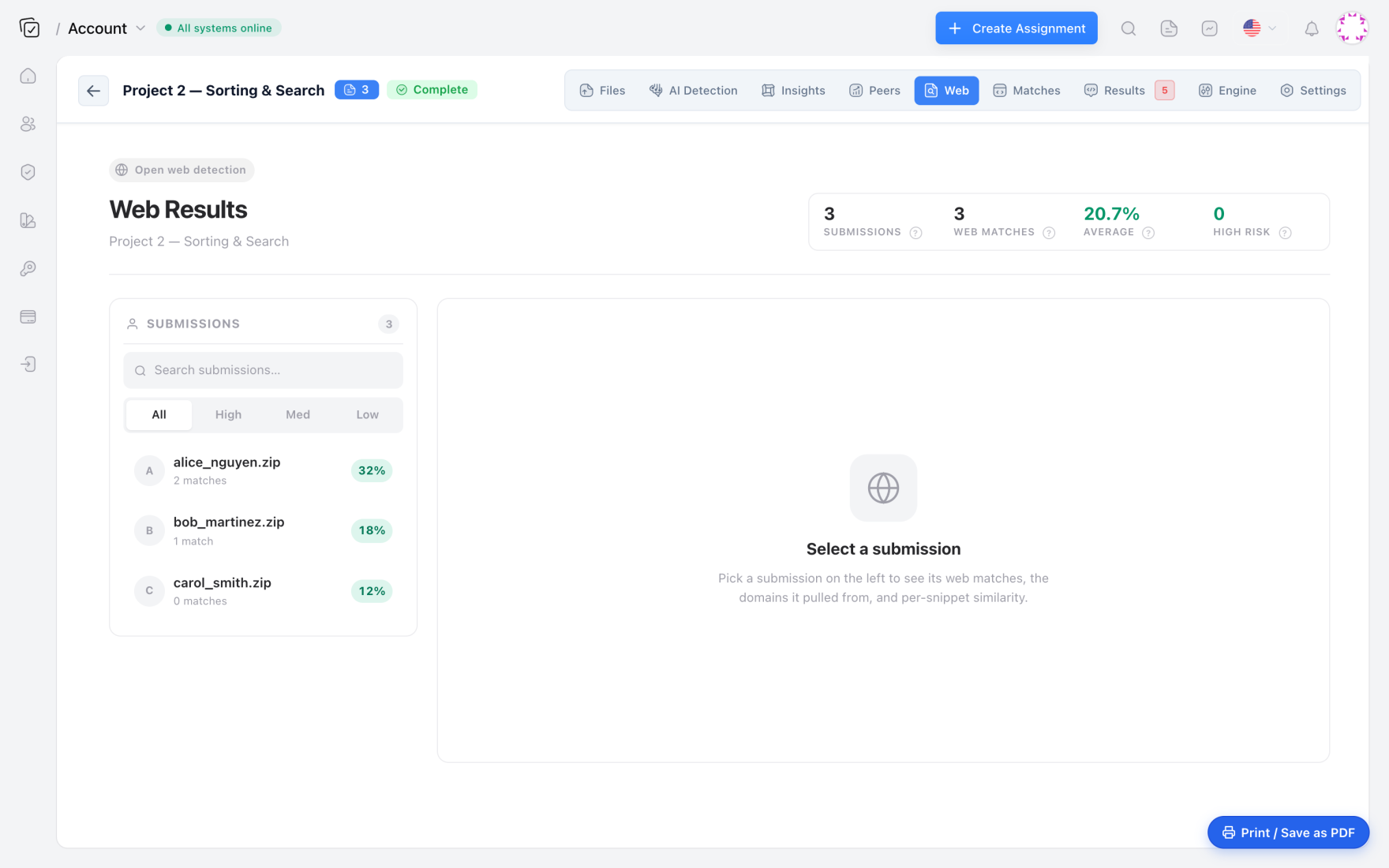
One of the most useful features I've found in Codequiry's web results is the per-domain breakdown. A submission that matches 70% of a single Stack Overflow answer is a smoking gun. A submission that matches 8% across several domains is usually just common imports or a standard textbook loop. The domain-level view lets me triage without opening every file.
Setting Up a Web-Source Check Without Losing an Afternoon
Here's the workflow I use now, refined over two semesters and about 400 total submissions. It takes about 15 to 20 minutes per assignment once you get the hang of it.
First, export submissions from Canvas or Blackboard as a zip file. Next, create a new check in Codequiry, select the programming language, and make sure both peer similarity and web similarity are enabled. The web matching engine needs a few extra minutes to run against the public code index, but for a batch of 50 submissions the whole scan finishes in under ten minutes. I usually start the check, go get coffee, and come back to a sorted report.
When the results load, I sort by web similarity descending. My personal review threshold is anything above 40% web similarity to a single domain. Below that, it's rarely worth opening the evidence view unless there's a specific reason, like a known hard part of the assignment where copying would be tempting. For each flagged submission, I open the evidence view and look for the telltale signs: identical variable names in non-obvious places, the same comments, the same whitespace and line breaks as the source. If the student renamed variables but kept the exact same control flow, token-based matching still flags it.
The time breakdown for a 50-submission class is roughly this: five minutes to set up and upload, eight minutes to scan, five to eight minutes to review the top five or six web matches, and two minutes to export a CSV for documentation. That's a total of about 20 minutes. Before I had web-source detection, I spent longer than that just trying to remember where I'd seen a suspicious function before, often ending up manually searching Stack Overflow with half-remembered code fragments.
False Positives, Starter Code, and the Calibration Problem
The first time I ran a web check on an assignment, I made a rookie mistake. I didn't exclude the starter code we had distributed to the entire class. The assignment skeleton included a Node class and a few utility methods that every student was required to use, and the web matcher flagged those files for every single submission. My web similarity report showed 60% matches across the board, which initially looked like a cheating epidemic. It wasn't. It was our own template code showing up in the public index because a previous semester's student had posted it on GitHub.
This is a real calibration issue, and it's the kind of detail that doesn't make it into the marketing copy. The fix is straightforward: upload the assignment's starter code as an excluded source before running the web check. After that, the checker ignores the template files and only flags similarities to external sources. I also maintain a whitelist of common permissively licensed snippets that I allow students to use, like the standard Java ArrayList iteration pattern or a basic Python file-reading loop. If a web match comes back and the source is on my whitelist, I dismiss it without opening the diff.
I haven't tested this workflow on more than a few hundred submissions per term, so I won't pretend it scales linearly to thousands without some adjustments. But across two semesters and four different courses, the false positive rate after excluding starter code has been low enough that my TAs spend less time chasing ghosts than they did with peer-only checks.
Stacking Web Checks with Peer and AI Detection So Nothing Slips Through
A single detection layer is no longer enough. I tell my TAs to think of it as three different vectors of cheating, each requiring a different detector. Peer similarity catches collusion among students in the same class. Web similarity catches solo copying from online sources. AI code detection catches students who asked ChatGPT or Copilot to write the whole assignment from scratch. A student might pass a peer check and a web check, then get flagged by the AI detector because their submission has the statistical signatures of LLM-generated code.
One TA on my team put it best: peer checkers catch the collusion, web checkers catch the solo thief, and AI checkers catch the ghostwriter. You need all three because they're different crimes.
Codequiry's combined report makes this practical. Each submission gets a peer similarity score, a web similarity score, and an AI generation probability. I sort by the maximum of the three, not by any single metric, because a student who copies from a classmate and then modifies it heavily might have only a moderate peer score but a high AI score if they used an LLM to refactor. The platform is the only one I've used that shows all three in one view without me having to export to a spreadsheet and merge results manually.
That integration matters. In the past, I ran MOSS for peer checking, then used a separate web search process that was basically me typing function signatures into Google, and then tried to guess whether an oddly fluent but unfamiliar code style came from an AI. It was three disconnected workflows. Consolidating them into one report cut my per-assignment review time from about 45 minutes to under 25.
For courses where AI use is a specific concern, the AI code detector layer catches patterns that neither peer nor web checks see: uniform comment density, certain kinds of loop unrolling, and statistical regularities in variable naming that human students rarely produce.
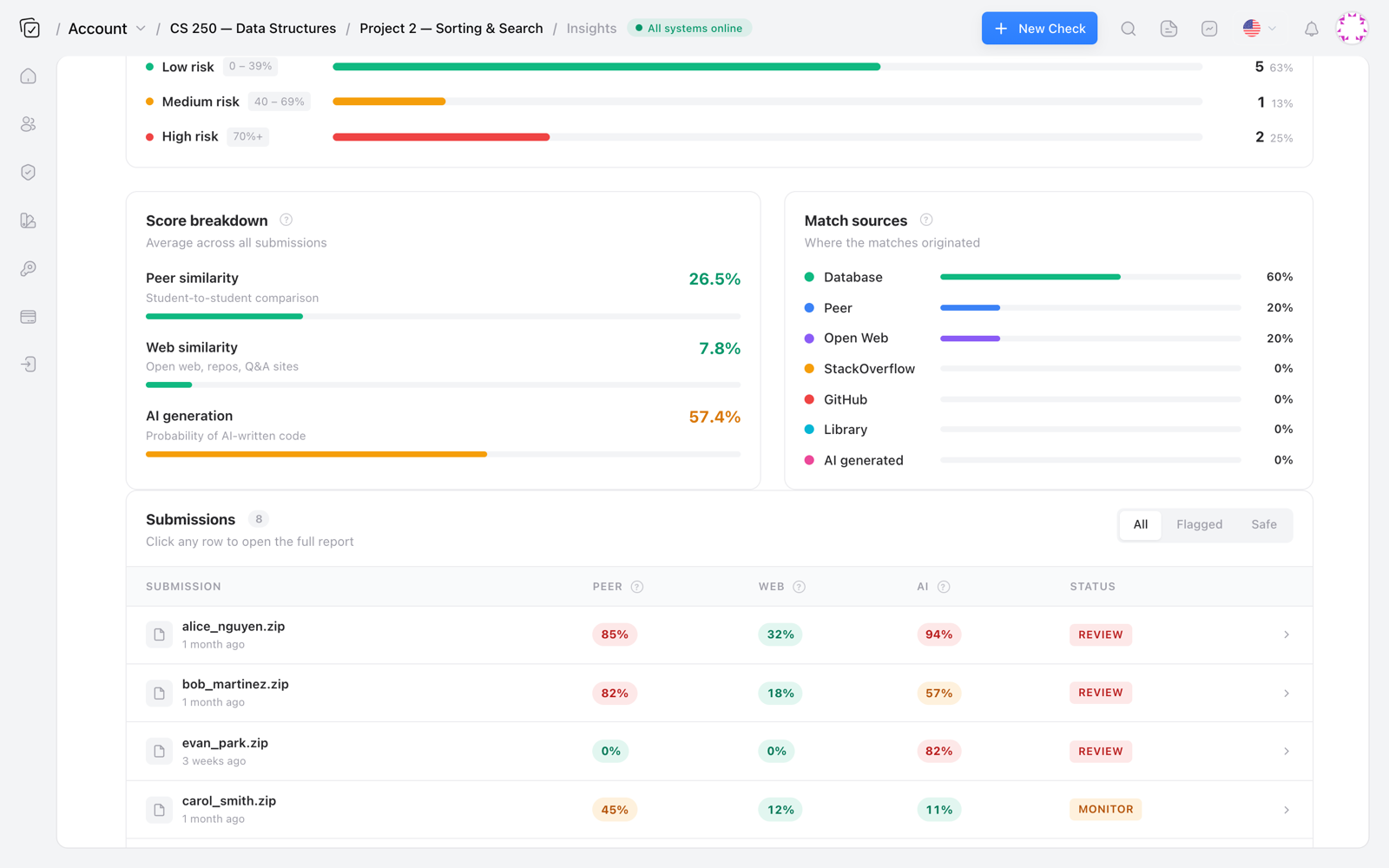
The screenshot above shows the breakdown I see for each assignment. The peer, web, and AI scores are separated, and the match sources are listed. When a student has a web match to a GitHub repo and an AI score of 80%, I know they probably copied code and then had an LLM clean it up. That's a different conversation than a student who just pasted a Stack Overflow answer.
Web Matches Are Also a Licensing and Policy Headache
Beyond the academic integrity question, web-sourced code carries legal and policy baggage that peer copying doesn't. A student who copies a GPL-licensed Java class from GitHub into a course project is introducing a copyleft obligation. If that project becomes part of a university's open-source portfolio or is later reused in a commercial context, the licensing problem surfaces. Similarly, in industry, a developer who pastes a Stack Overflow answer without checking the license can create exposure for the company, especially if the code ends up in a proprietary product.
Web-source detection helps here because the match report includes the source URL and domain. The license context is often determinable from that: a GitHub repo with a LICENSE file, a Stack Overflow answer under CC BY-SA, a tutorial site with its own terms. In my course, I use web matches not only to enforce academic integrity but also to teach students about code provenance. The first time a student sees a web match report showing that the function they copied has a GPL header, it's a teachable moment about why copying code without attribution isn't just a rules violation, it's a professional liability.
For enterprise teams, this same mechanism works for contractor code verification. If you've hired an external developer and want to confirm the code they deliver is original and not lifted from GitHub, a web-source check against a plagiarism checker for code with web matching gives you a defensible answer. You're not just protecting IP; you're avoiding the nightmare of shipping code that violates someone else's license.
A Full Grading Workflow for a 50-Submission CS3 Assignment
Let me walk through the exact steps I follow for a typical data structures assignment in Java, because the specific order matters. This is the workflow I'd give to a new TA on day one.
Step one: export submissions from the LMS. I use Canvas, and the export produces a zip with one folder per student. Step two: upload that zip to Codequiry, select Java as the language, and enable both peer and web detection. Step three: set the excluded sources to include the starter code we distributed. This is the step everyone forgets the first time. Step four: run the check and wait about eight minutes. Step five: open the results and sort by web similarity descending. Step six: for the top five or six submissions, open the evidence view and compare the student's code against the matched source. Step seven: if the match is confirmed, download the evidence PDF and follow your institution's academic integrity process.
I also use a small Python script to process the CSV export from Codequiry, because I like having a local record and because sorting a spreadsheet in a terminal is faster than clicking around the web UI. Here's the snippet I use:
import csv
with open('codequiry_results.csv') as f:
    reader = csv.DictReader(f)
    rows = list(reader)
rows.sort(key=lambda r: float(r['web_similarity']), reverse=True)
for r in rows[:5]:
    print(f"{r['student']}: {r['web_similarity']}% - {r['top_source_url']}")
That prints the top five web-similarity submissions with their top source URL. I paste the output into a Slack message to myself so I have a checklist for the manual review. It's a small thing, but it keeps me from re-sorting the dashboard twelve times.
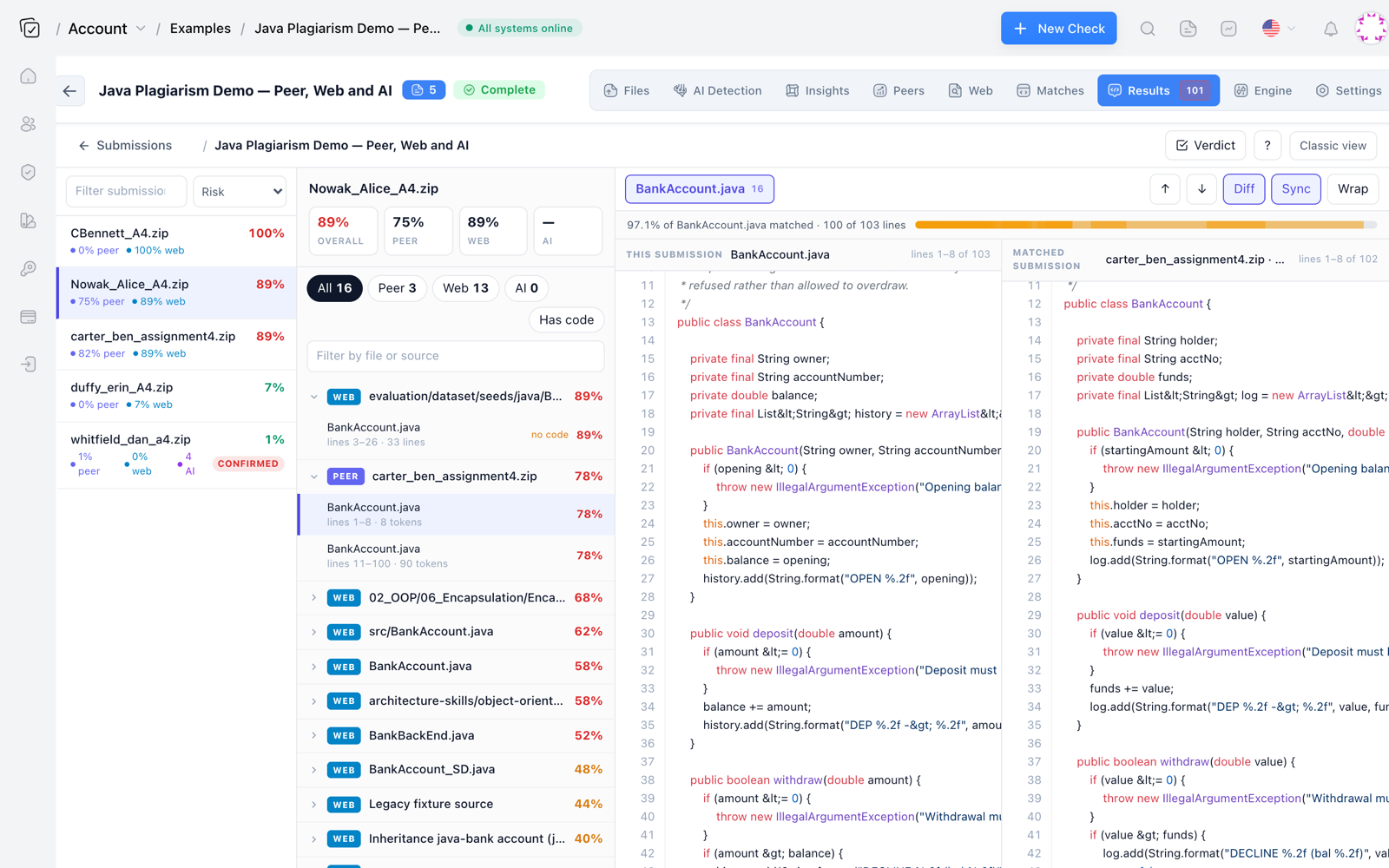
The evidence view is where the real work happens. The side-by-side diff shown above is what I show the student when I meet with them. There's no argument when the same variable names, same comments, and same line breaks appear on both sides. In one case last semester, the student had even left the source's author name in a comment. The web match made that trivially easy to prove.
Where Web-Source Detection Still Struggles
I don't want to overstate this. Web-source detection is not a magic wand. If a student copies from a private GitHub repository that isn't indexed, the checker won't find it. If they copy from a small tutorial site that hasn't been crawled, same problem. Heavily modified code, where the student renamed every variable, changed the loop structure, and added trivial comments, can drop the web similarity score below my 40% threshold even if the core algorithm is still traceable to a specific source. In those cases, you need to rely on the AI detector or just your own judgment.
Also, snippet-level copying is harder than whole-file copying. A student who grabs only a five-line function from Stack Overflow may have an overall web similarity of 12%, which is below my review threshold. I've learned to check per-file web scores for assignments where a hard problem appears as a small function, because the overall score hides a high local match. Codequiry's per-file web analysis helps here, but it requires an extra click or two to drill down.
These limitations are real, and I've hit them in practice. The system is strongest when the source is public and the student copied a substantial block of code without much modification. That covers the majority of web plagiarism I see in undergraduate courses, but it won't catch a sophisticated student who deliberately obfuscates. For those cases, the layered approach with AI detection and peer matching is still necessary.
If you've been relying only on peer similarity, you're missing a whole category of plagiarism that's been hiding in plain sight. Adding a web-source check takes 15 to 20 minutes per assignment and catches the student who copied from a 2016 Stack Overflow answer instead of a classmate. The tool that makes this practical is a code plagiarism checker that indexes the open web and GitHub alongside peer submissions. Once you see the first web match report with a clear source URL, you'll wonder how you graded without it.