

A recent batch scan of 9,301 Python files from an introductory programming course surfaced 1,204 web matches to Stack Overflow, 388 to GitHub repositories, and 94 near-identical copies of a single matplotlib histogram snippet. The most copied block was a 23-line function that renamed variables but kept the original stackoverflow.com answer's comment order and a misspelled label. That kind of detection does not happen by diffing text. It happens with token fingerprints and a web index.
You can scan a directory of Python files for web-sourced code by normalizing each file into tokens, uploading the corpus to Codequiry with web matching enabled, and reviewing the match report against source URLs. This guide walks through the same process I use on course exports and contractor repos.
What Does a Web Code Scanner Actually Compare?
A text diff between a student's file and a Stack Overflow answer fails the moment either side changes whitespace, variable names, or comment wording. A code scanner that detects web-sourced code works differently. It tokenizes the source, selects stable fingerprints from those tokens, and queries a prebuilt index of public web pages, GitHub files, and Stack Overflow answers.
The tokenization step is where most false negatives die. Python's standard library gives you a lexer that collapses NUMBER, STRING, and NAME into type markers while keeping operators. Renaming data to df no longer hides the structure.
import tokenize, io

def normalize_py(source: str) -> list[str]:
    tokens = []
    for tok in tokenize.generate_tokens(io.StringIO(source).readline):
        if tok.type in (tokenize.NAME, tokenize.NUMBER, tokenize.STRING):
            tokens.append(tok.type)
        elif tok.type == tokenize.OP:
            tokens.append(tok.string)
        elif tok.type == tokenize.NEWLINE:
            tokens.append('NL')
        elif tok.type == tokenize.INDENT:
            tokens.append('INDENT')
        elif tok.type == tokenize.DEDENT:
            tokens.append('DEDENT')
    return tokens
Fingerprinting selects local windows of these tokens and hashes them. Winnowing, described by Schleimer et al. 2003, keeps only a subset of those hashes per window so the index stays small while preserving enough overlap to catch partial copies. A production scanner then compares the selected fingerprints against a web index. Codequiry also layers an abstract syntax tree pass on top of the token stream, which catches reordered statements and reorganized control flow that pure token winnowing misses.
This is a different mechanism from a code plagiarism checker that only checks peer submissions. Codequiry does both, but this guide focuses on the web-source side.
Step 1 Collect the Python Files
If you're auditing a course, export the submissions zip from Canvas, Gradescope, or your LMS of record. Unzip it into one directory per assignment. If you're auditing a contractor's repository, clone the repo and point the scanner at the source tree.
The simplest collection script walks a directory and gathers every .py file. I keep the script below in whatever directory I drop the export into.
from pathlib import Path

def collect_python_files(root):
    files = []
    for pattern in ('*.py', '*.pyi'):
        files.extend(Path(root).rglob(pattern))
    return files
For Jupyter notebooks, convert them before scanning. The first version of our upload script omitted .ipynb files because we forgot that notebooks are JSON, not text. A TA noticed 14 missing notebooks after the scan ran. Convert with jupyter nbconvert --to script and add the generated .py files to the folder. This also gives you a clean text file to feed the fingerprinting step.
Step 2 Generate Token Fingerprints Locally
Codequiry performs tokenization and fingerprinting server-side, so this step is optional. I still run it locally for two reasons. First, local fingerprints tell me how many distinct structural patterns exist before I upload, which helps me spot a misconfigured export. Second, if two files produce identical fingerprint sets, I already know they are near duplicates and can review them together without waiting for the web match results.
Here is a simplified local fingerprint function. Real winnowing from Schleimer et al. 2003 selects the minimum hash per window rather than returning every block hash, but this version is enough for a quick similarity sanity check.
import hashlib

def winnow_fingerprints(tokens, window_size=4):
    fingerprints = []
    window_hashes = []
    for i in range(len(tokens) - window_size + 1):
        block = ' '.join(tokens[i:i+window_size])
        h = int(hashlib.sha256(block.encode()).hexdigest(), 16)
        window_hashes.append(h)
        if i >= window_size - 1:
            min_h = min(window_hashes[-window_size:])
            fingerprints.append(min_h)
    return fingerprints
Do not use this toy implementation to make final integrity decisions. It has no AST pass and no web index. It will flag common boilerplate aggressively. Use it only to pre-cluster files before the real scan.
Step 3 Upload the Corpus to Codequiry
Log into the Codequiry dashboard and create a new check. Select Python as the language and enable web matching. If you have a mix of student submissions and known starter code, upload the starter code as a separate reference set so the web engine can subtract those matches.
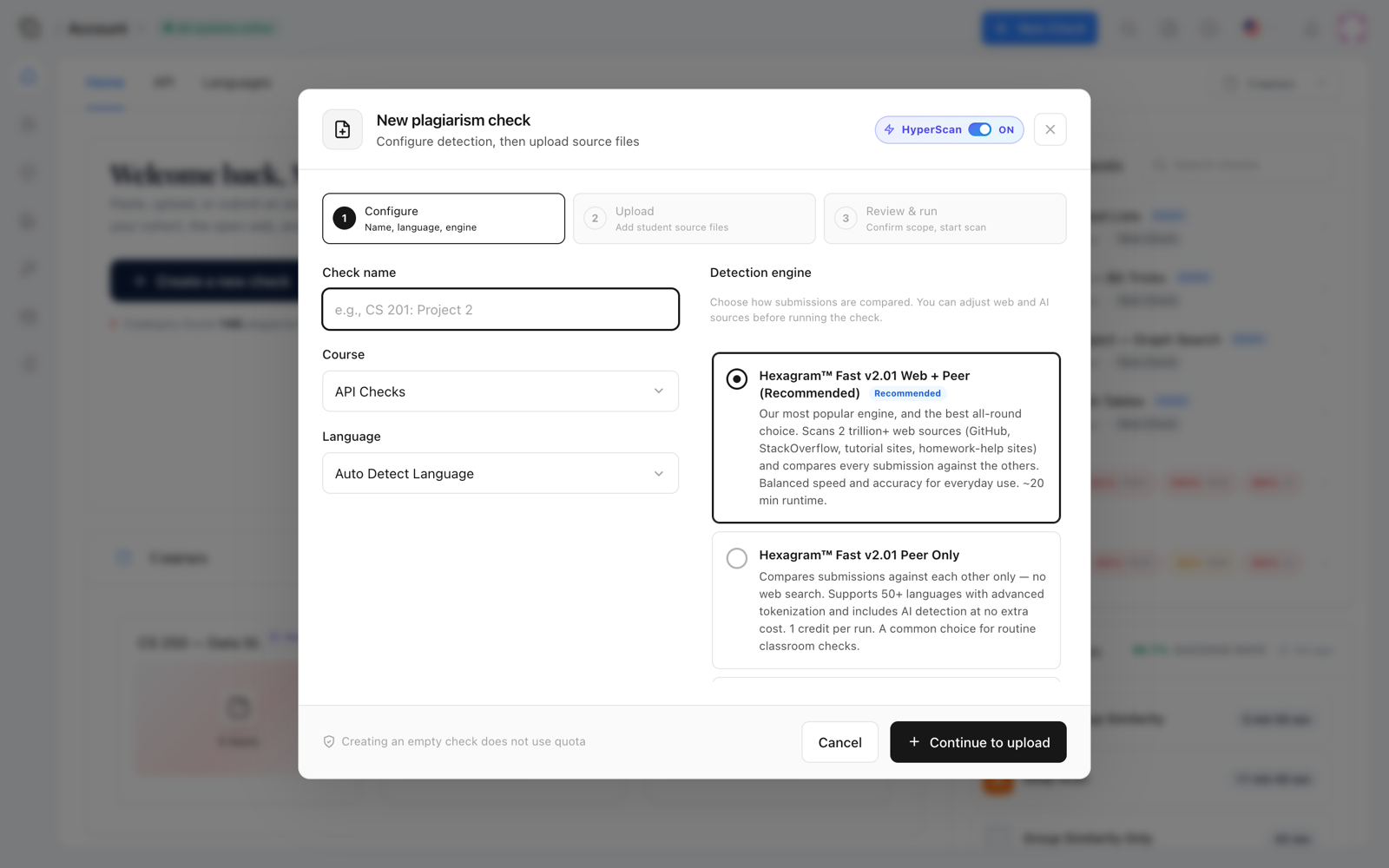
Upload all of the Python files collected in Step 1. The dashboard accepts a zip and then runs the tokenization, fingerprinting, peer similarity, and web index queries in one pass. The web scan, specifically, checks against public GitHub repositories, Stack Exchange pages, tutorial sites, and other indexed code sources.
Step 4 Read the Web Match Report
When the scan finishes, Codequiry shows a per-file web match percentage and a list of source URLs for each flagged file. A high percentage means a large fraction of the file's tokens matched a specific source, not that the entire file was copied verbatim. A 91 percent match to a Stack Overflow answer with no attribution is different from a 40 percent overlap in a standard matplotlib setup block.
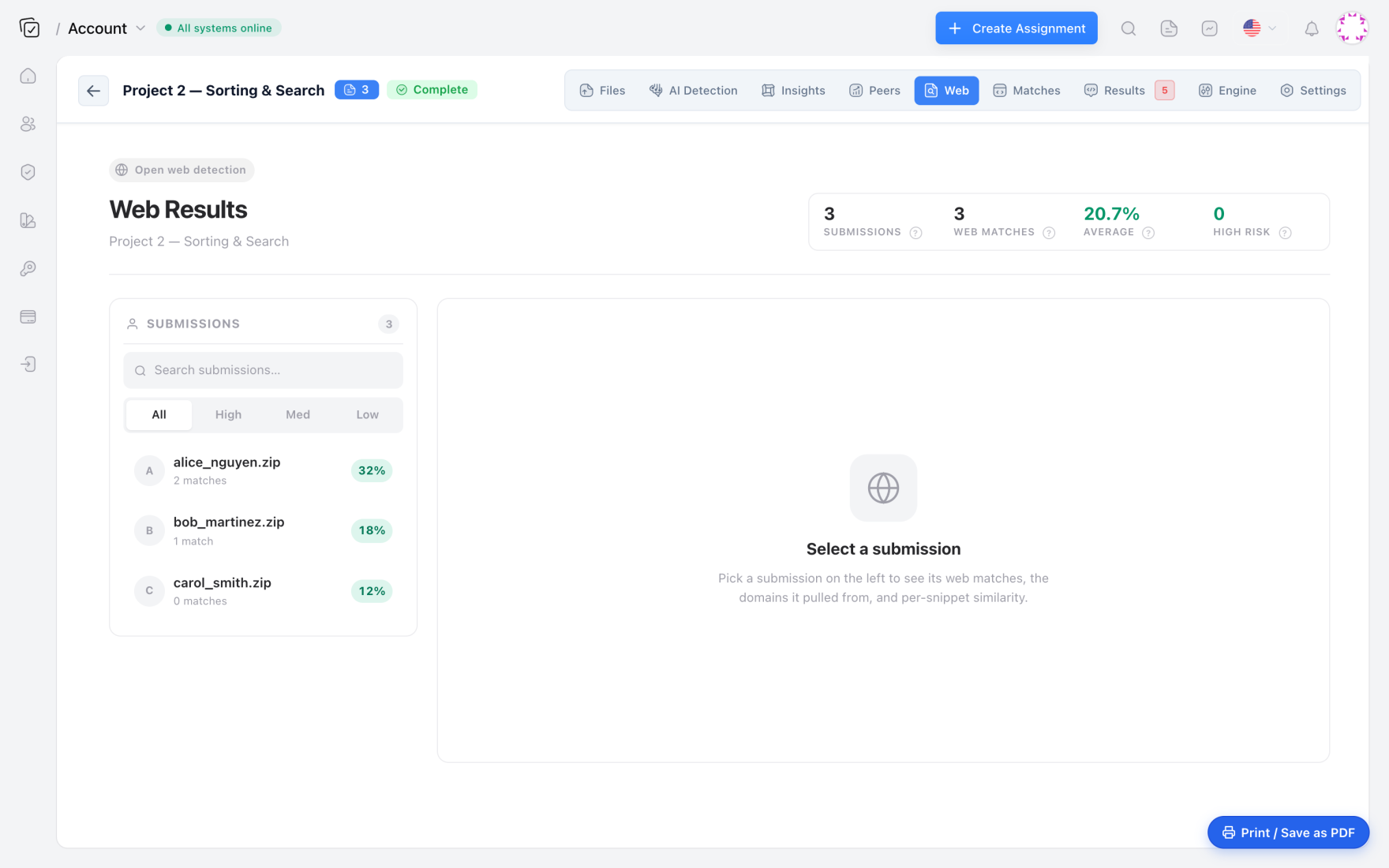
The first thing I look for is the distribution. A normal assignment shows a long tail of low single-digit matches from common functions like def main or a standard CSV reading loop. A bimodal distribution with a spike at 70 to 95 percent almost always means a subset of the class found the same answer and copied it. That spike is where review time goes first.
Step 5 Trace a Match to Its Source
Clicking a flagged file opens the evidence view. It displays the student's code on one side, the matched web source on the other, and a synced diff below. The diff shows which lines came from the source and which were changed. A student who honestly adapted a Stack Overflow snippet usually changes the variable names to match the assignment context and adds comments explaining the adaptation. A student who copied usually changes only what a mentor would notice.
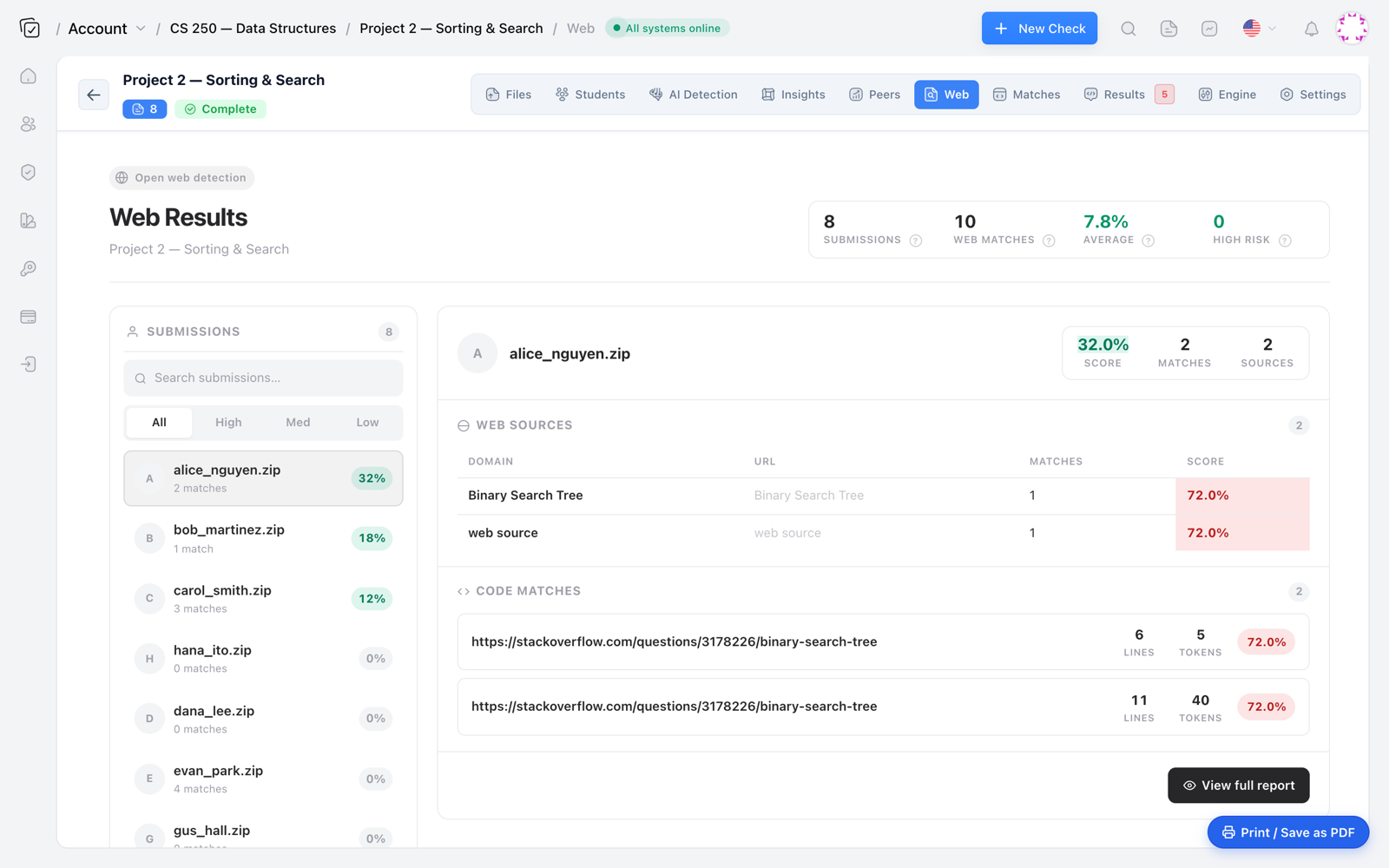
One useful signal is the comment sequence. In the 9,301-file scan, several files matched a Stack Overflow answer that included the comment # plot the histgram with the same typo. The students removed the typo, but the web index still matched the surrounding tokens. That is the kind of provenance tracing you cannot do with a local diff.
Step 6 Decide What Counts as Dishonest
Web code reuse is not automatically plagiarism. The line between acceptable reuse and academic dishonesty depends on three things: the course policy, whether the student disclosed the source, and whether the copied code forms the core of the assignment.
A high web match does not prove plagiarism. It proves provenance. The plagiarism determination still happens in the review step, where you check whether the student attributed the source or hid it.
For enterprise code, the question is usually not academic integrity but license compliance. A contractor who pastes a GPL-licensed function from a GitHub repo into proprietary code creates a licensing problem even if they add attribution. A source code plagiarism checker that includes web sources is the right tool for that review, because it traces the code back to the exact repository and license context.
Step 7 Run an AI Check on Flagged Files
Some flagged files will not match any web source but still look unlike the student's prior work. A student who asks ChatGPT to rewrite a Stack Overflow answer often ends up with code that has no web fingerprint match at all. Codequiry's web scan will not catch that case, which is why I run an AI-generated code detection pass on the files that have low web similarity but high structural similarity to other submissions.
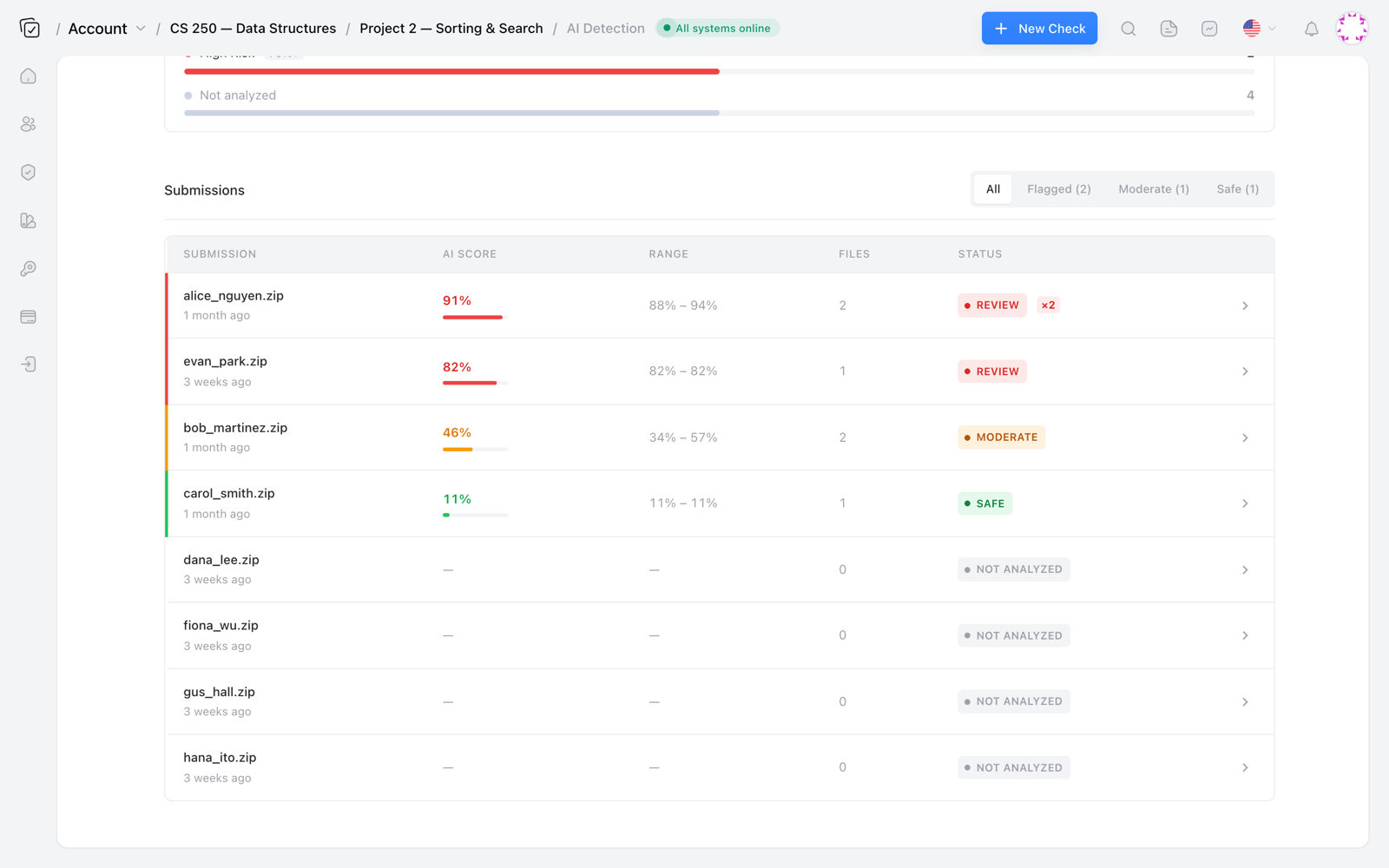
The AI code detector uses a different statistical signal. Web matching looks for provenance, while AI detection looks for the uniform perplexity and low burstiness patterns typical of LLM output. Running both is not redundant. It catches two different failure modes.
False Positives and a Rollout Detail
Token winnowing without an AST pass will false-positive on common boilerplate. A function that reads a CSV and prints the first five rows appears in hundreds of web sources. Codequiry reduces this by matching longer fingerprints and checking source URL relevance. But no scanner eliminates the need for human review. I have not tested the current web index past a few hundred submissions at a time, so my guidance on false positive rates is based on manual review of flagged files, not a formal precision measurement.
One practical detail from a rollout last semester: we ran the scan on a Friday afternoon, skimmed the top 20 matches, and sent three academic integrity referrals. The following Monday we found two more files with 88 percent matches that were buried at the bottom of the report because the filenames started with zz_. Sort the report by match percentage, not filename, before you review.
Frequently Asked Questions
How does web code plagiarism detection differ from peer similarity?
Peer similarity compares a submission against other submissions in the same course. Web similarity compares it against an indexed set of public web pages, GitHub repos, and Stack Overflow answers. A student who copies from a classmate trips peer detection. A student who copies from Stack Overflow trips web detection. Some tools do only one. Codequiry does both.
Can Codequiry detect paraphrased code from Stack Overflow?
Yes, within limits. The tokenization and fingerprinting engine survives variable renaming, comment deletion, and whitespace changes. It will not catch a student who reimplements the same algorithm from scratch without looking at the original code. That is not plagiarism in the source-code sense, even if the idea came from a web search.
What file types can I scan for web-sourced code?
Codequiry supports 65 approved languages, including Python, Java, C++, JavaScript, and C. You can submit a zip with mixed file types. For notebook files, convert to .py or submit the extracted code cells.
How do I interpret a web match percentage?
The percentage reflects the proportion of a file's tokens that matched a particular web source. Treat anything above 70 percent as requiring manual review. Treat 40 to 70 percent as context-dependent. Below 40 percent is usually common boilerplate, unless the matched tokens form a critical assignment function.
If you want to run this workflow on your next course or contractor audit, start with a code plagiarism checker that includes web source matching and AI detection in the same report. The setup takes about fifteen minutes, and the review time it saves you is considerably larger.