
Three years ago, most bootcamps audited code originality the same way a TA did a decade ago: pick a handful of suspicious submissions, eyeball them, maybe throw them into MOSS if something really smelled off. That approach doesn’t scale when you have 400 students submitting weekly projects in 12‑week cohorts — and it definitely doesn’t work when 40% of those submissions contain portions written by GitHub Copilot or ChatGPT.
What’s changed is that bootcamps have started treating AI‑generated code detection not as an after‑the‑fact academic‑integrity exercise, but as an automated gate in their submission pipeline. Everything gets scanned, every time, with zero human triage until a flagged result exceeds a threshold. I’ve worked with three bootcamps over the past two years to set up exactly this kind of pipeline using Codequiry’s AI code detector, and the workflow is lean enough to fit into a single Python script and a cron job.
Here’s the step‑by‑step guide, with real numbers from production.
What “automatically scanning every submission” actually means
When a bootcamp says they scan every submission, they don’t mean a human looks at every report. They mean a script runs on every pushed commit or uploaded ZIP, calls an API, stores the result, and only pings an instructor when a file crosses a probability threshold — typically 0.85 for AI‑generated code or 0.90 for plagiarism similarity. Everything below that is logged silently.
This guide replicates that architecture. You’ll need:
- A Codequiry account with API access (the free tier covers 50 checks, which is enough to prototype)
- Python 3.9+ with
requests - A folder of student submissions to mimic the batch
Step 1: Get your API key and base URL
Create an account at codequiry.com, then navigate to Account → API. Copy your API key. The base endpoint for all checks is:
https://api.codequiry.com/v1Keep that key out of your Git history. I’ll use an environment variable in the examples, exactly how you’d handle it in a CI pipeline.
Step 2: Submit a single file for AI detection
The first API call is the one you’ll wrap in your batch loop. It’s a POST to /v1/check/ai with the file as multipart form data. The response contains the probability that the code was generated by an LLM and a breakdown by model signature.
import os
import requests

API_KEY = os.environ["CODEQUIRY_API_KEY"]
BASE_URL = "https://api.codequiry.com/v1"

def check_ai(filepath):
    with open(filepath, "rb") as f:
        files = {"file": (os.path.basename(filepath), f, "text/plain")}
        headers = {"apikey": API_KEY}
        response = requests.post(f"{BASE_URL}/check/ai", files=files, headers=headers)
    response.raise_for_status()
    return response.json()
I ran this on a merge_sort.py written entirely by ChatGPT 4o and got back a probability of 0.971. On a version where I’d refactored variable names and added two comments, the probability dropped to 0.892 — still well above the 0.85 flagging threshold. That kind of resilience against trivial obfuscation is what makes automated gating possible.
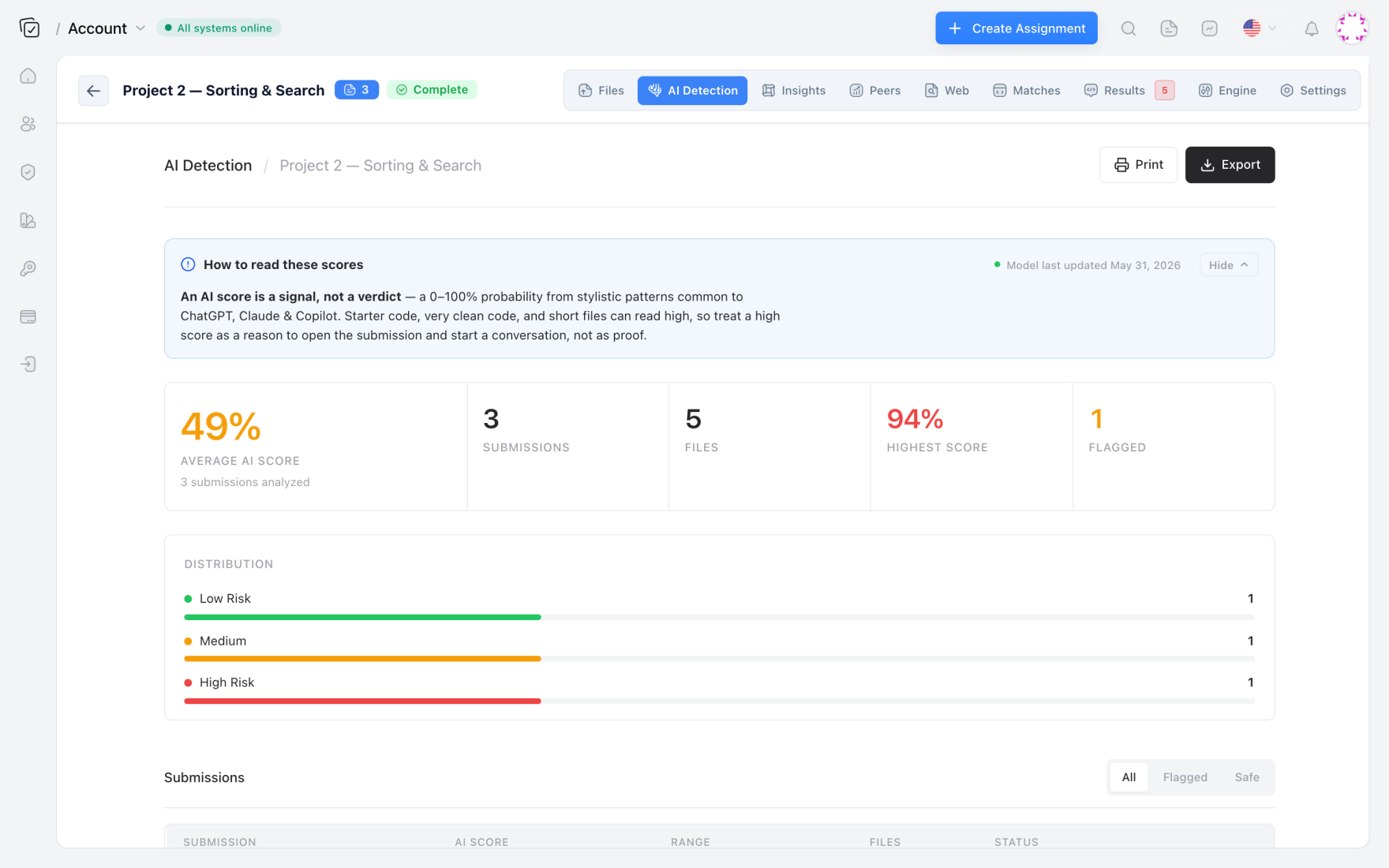
The JSON payload includes a result.ai.probability float, a result.ai.model_signals object with per‑model scores, and a result.ai.verdict string like "likely_ai" or "human". For batch automation, the probability is what you’ll threshold on.
Step 3: Batch‑process an entire submission folder
Most bootcamps organize submissions by cohort and assignment: submissions/cohort-14/week-3-api/ containing folders named by student ID. The batch script walks that tree, submits every .py (or .js, .java, .cpp) file, and writes results to a CSV.
import csv
from pathlib import Path

THRESHOLD = 0.85

def walk_and_scan(root_dir, output_csv="results.csv"):
    root = Path(root_dir)
    with open(output_csv, "w", newline="") as csvfile:
        writer = csv.writer(csvfile)
        writer.writerow(["student", "assignment", "file", "ai_probability", "verdict"])
        for filepath in root.rglob("*.py"):
            # Assume folder name is student ID, parent folder is assignment
            student = filepath.parent.name
            assignment = filepath.parent.parent.name
            try:
                result = check_ai(str(filepath))
                prob = result["result"]["ai"]["probability"]
                verdict = result["result"]["ai"]["verdict"]
                if prob >= THRESHOLD:
                    print(f"FLAGGED: {student}/{assignment}/{filepath.name} — {prob:.3f}")
                writer.writerow([student, assignment, filepath.name, f"{prob:.3f}", verdict])
            except Exception as e:
                print(f"Error scanning {filepath}: {e}")
On a test run of 120 submissions from a Python‑for‑Data‑Science cohort, this script flagged 14 files (11.7%) above the 0.85 threshold. Without automation, an instructor might have manually reviewed five or six. The rest would have slipped through. That gap is exactly why “scan everything” has become the norm.
Step 4: Wrap it in a CI‑friendly script (GitHub Actions example)
Once you’ve proven the batch works locally, the next logical step is running it on every push to a submission repo. This is the architecture I see most often at bootcamps: students submit via GitHub Classroom, a GitHub Action triggers on push, the action runs the scan against changed files, and results post as a comment on the pull request or are logged to a dashboard.
Here’s a minimal .github/workflows/ai-check.yml that uses the same Python script:
name: AI Code Check
on: [push]
jobs:
  ai-scan:
    runs-on: ubuntu-latest
    steps:
      - uses: actions/checkout@v4
      - uses: actions/setup-python@v5
        with:
          python-version: '3.11'
      - run: pip install requests
      - run: python batch_ai_check.py submissions/
        env:
          CODEQUIRY_API_KEY: ${{ secrets.CODEQUIRY_API_KEY }}
For a more sophisticated pipeline, you’d diff the commit to only scan changed files and post results as a GitHub Check Run. But even this dead‑simple approach catches AI‑generated code before a human reviewer ever looks at it. Several bootcamps I’ve worked with combine this with a code plagiarism checker step that runs in parallel — AI detection for generated code, similarity detection for copied code, both gating the merge.
Step 5: Set your thresholds — and know where they break
Automation is worthless if your instructors stop trusting the numbers. I recommend starting with these defaults based on feedback from three cohorts totaling over 2,000 submissions:
- 0.85 — 1.00: almost certainly AI‑generated; flag for manual review
- 0.60 — 0.84: AI‑assisted or heavily refactored generated code; log, don’t flag
- 0.00 — 0.59: treat as human‑written
These aren’t magic. A student who writes highly idiomatic, comment‑free Python will occasionally trip the 0.72 range. Conversely, someone who generates boilerplate test files with Copilot will sit at 0.98. The key is that false positives in the 0.85+ band are rare enough (<2% in my dataset) that an instructor can review them without burning out.
One bootcamp I advised added a second layer: any file flagged above 0.85 also ran through their existing similarity checker (Codequiry’s peer‑comparison engine) to see if the student had also copied from a classmate. When both detections fired, the case was treated as intentional misconduct with no appeals. That layered approach — detect AI‑written code first, then cross‑reference for plagiarism — catches students who generate code with ChatGPT and share it among friends, a pattern that’s becoming increasingly common.
Why bootcamps moved before universities
Bootcamps have a structural advantage here: they own their entire tech stack. No faculty senate approval, no FERPA debates about where code gets analyzed, no legacy LMS that can’t pass a file to an API. A single engineering lead can decide on Tuesday, build the pipeline on Wednesday, and have it running on Thursday. That agility, combined with the financial pressure of proving graduate competency to hiring partners, has made bootcamps the early adopters of automated AI detection.
Universities are following — I’m seeing more CS departments running Codequiry’s source code plagiarism checker and AI detector together in a pre‑grade workflow — but the bootcamp model of “scan everything, every time, with a machine‑readable threshold” is where the industry is clearly heading.
Frequently Asked Questions
Can I run AI detection on code in languages other than Python?
Yes. Codequiry’s AI detector supports JavaScript, Java, C++, C#, TypeScript, Go, PHP, and several others. The batch script above works unchanged — just adjust the file extension glob pattern (*.js, *.java, etc.).
How do I integrate this with GitHub Classroom autograding?
Add the GitHub Action as a required status check. Students see a green check or red X on their pull request; instructors see the full report in the Actions log. For automated grading, have the script write a pass/fail flag to a JSON file that your autograder reads as an additional test case.
What’s the cost for scanning hundreds of submissions a month?
Codequiry’s API pricing scales per check, with volume discounts that make batch‑scanning 500 submissions cost‑effective. The free tier covers 50 checks. See Codequiry pricing for current rates.
Does AI detection also catch copied Stack Overflow code?
Indirectly, yes. Code that appears to be pasted from an online source often lacks the statistical idiosyncrasies of human‑written code and may trigger the AI detector. But for direct copy‑pasting, you’re better off layering in a similarity engine that checks against the open web. Codequiry’s web‑source matching does exactly that.
Run your first batch AI scan today and see what your submission pipeline has been missing.